

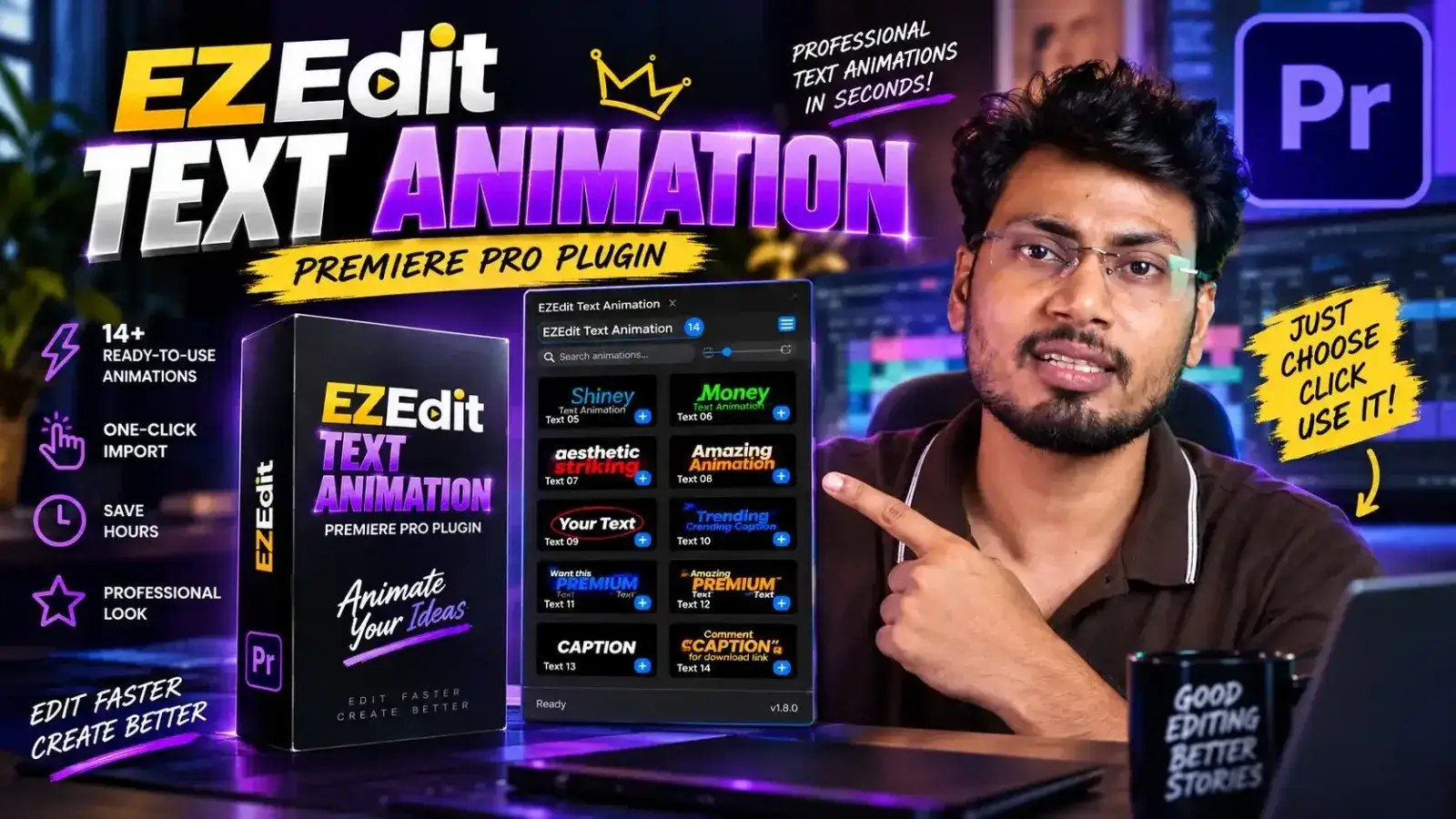
Professional Text Animation for Adobe Premiere Pro
Creating animated text manually can be time-consuming, especially when you’re working on multiple videos every day.
You may have to create and adjust keyframes for Position, Scale, Rotation, Opacity and other properties repeatedly.
EZEdit Text Animation simplifies this process.
With ready-to-use Premiere Pro text animation presets, you can quickly add professional-looking motion to your titles, captions, headings, keywords, callouts and other text elements.
Whether you’re editing a YouTube video, Instagram Reel, YouTube Short, advertisement, educational video or client project, EZEdit helps you speed up your workflow.
Why Choose EZEdit Text Animation?
🚀 One-Click Text Animation
Apply professional text animations without manually creating complicated keyframes.
🎬 14+ Ready-to-Use Animations
Get a collection of professionally designed text animation styles that can be used across different types of video projects.
⚡ Faster Editing Workflow
Reduce repetitive animation work and spend more time focusing on your creative edit.
🎯 Easy for Beginners
You don’t need advanced motion graphics knowledge to start creating animated text.
💻 Designed for Premiere Pro
EZEdit Text Animation is created specifically for editors working with Adobe Premiere Pro.
📱 Perfect for Modern Content
Create dynamic text for YouTube videos, Instagram Reels, YouTube Shorts, ads, tutorials, podcasts, educational videos and more.
What’s Included?
When you get EZEdit Text Animation, you get access to:
- 14+ Professional Text Animation Presets
- Easy-to-use Premiere Pro workflow
- One-click animation application
- Multiple animation styles
- Fast text animation workflow
- Ready-to-use presets for your projects
- Lifetime access to the purchased version
- Future improvements and updates according to the product’s update policy
Note: The exact number of included animations and update/support terms may change as EZEdit releases new versions. Please check the latest product version before purchase.
Create Eye-Catching Text Animations
Use EZEdit Text Animation to animate:
✨ Titles
Create professional animated titles and opening text.
🔥 Highlight Text
Make important words and information stand out.
🎯 Callouts
Add attention-grabbing text callouts to your videos.
📱 Social Media Text
Create engaging animated text for Reels, Shorts and social media content.
🎓 Educational Videos
Make important concepts, keywords and explanations more visually engaging.
💼 Promotional Videos
Create dynamic text animations for advertisements and marketing videos.
▶️ YouTube Videos
Give your YouTube content a more professional and engaging visual style.
How EZEdit Text Animation Works
Step 1 — Install the Plugin
Install EZEdit Text Animation in your Adobe Premiere Pro environment.
Step 2 — Open Premiere Pro
Launch Premiere Pro and open your video editing project.
Step 3 — Select Your Text
Choose the text or graphic element you want to animate.
Step 4 — Choose an Animation
Browse the available EZEdit text animation presets and select the style you want.
Step 5 — Apply the Animation
Use the simple one-click workflow to apply the selected animation.
Step 6 — Continue Editing
Your text animation is ready. Make additional adjustments if required and continue creating your video.
Select → Apply → Animate → Done.
Stop Creating the Same Keyframes Again and Again
If you’re a video editor, you already know how repetitive text animation can become.
You create one animation.
Then another.
Then another.
And suddenly you’re spending a huge amount of editing time doing the same thing.
EZEdit Text Animation helps you turn that repetitive process into a much faster workflow.
Instead of:
❌ Creating keyframes manually
❌ Repeating the same animation process
❌ Adjusting multiple properties again and again
❌ Wasting valuable editing time
You can:
✅ Choose a ready-made animation
✅ Apply it quickly
✅ Customize it when needed
✅ Move on to your next editing task
Perfect for Every Type of Video Editor
EZEdit Text Animation can be useful for:
- YouTube Video Editors
- Instagram Reels Editors
- YouTube Shorts Editors
- Freelance Video Editors
- Content Creators
- Motion Graphics Designers
- Social Media Managers
- Digital Marketing Agencies
- Video Production Agencies
- Corporate Video Editors
- Educational Content Creators
- Podcast Editors
- Advertisement Editors
- Beginners Learning Premiere Pro
- Professional Video Editors
Take Your Premiere Pro Editing Workflow to the Next Level
Your editing workflow should be about creativity, not repetitive tasks.
EZEdit Text Animation gives you a library of ready-to-use animations so you can create engaging text faster.
Whether you’re editing your first YouTube video or working professionally with multiple clients, having a reliable collection of text animation presets can save valuable time.
Built for Creators Who Want to Edit Faster
For YouTubers
Create more engaging titles, headings and highlighted text without spending unnecessary time on animation.
For Reels & Shorts Editors
Add dynamic animated text to short-form videos and make important information stand out.
For Freelancers
Speed up repetitive editing tasks and deliver projects more efficiently.
For Agencies
Create a consistent visual style across multiple client projects.
For Beginners
Start creating professional-looking text animations without having to master complex animation techniques first.
EZEdit Text Animation vs Manual Keyframing
| Feature | Manual Animation | EZEdit Text Animation |
|---|---|---|
| Ready-made animations | ❌ | ✅ |
| One-click workflow | ❌ | ✅ |
| Reusable animation presets | Manual setup | ✅ |
| Beginner friendly | Difficult | ✅ |
| Faster workflow | ❌ | ✅ |
| Designed for Premiere Pro | — | ✅ |
| Multiple text animation styles | Manual creation | 14+ presets |
Make Your Text More Engaging
Text is one of the most important visual elements in modern video content.
Static text can communicate information.
Animated text can direct attention.
Use EZEdit Text Animation to emphasize:
Important Words
Key Information
Numbers & Statistics
Titles
Questions
Calls to Action
Names & Locations
Highlights
Create a stronger visual connection between your message and your audience.
Frequently Asked Questions
What is EZEdit Text Animation Plugin?
EZEdit Text Animation is a text animation plugin for Adobe Premiere Pro that provides ready-to-use text animation presets. It helps video editors create animated text faster without building every animation manually from scratch.
How many text animations are included?
The current product includes 14+ ready-to-use text animation presets.
The library may be expanded with future versions and updates.
Does it work with Adobe Premiere Pro?
Yes. EZEdit Text Animation is designed specifically for Adobe Premiere Pro.
Is it suitable for beginners?
Yes. The plugin is designed to make text animation easier and faster, so beginners can start using ready-made animations without needing advanced animation skills.
Can professional video editors use it?
Absolutely. Professional editors can use it to speed up repetitive text animation tasks and improve their editing workflow.
Can I use these animations for YouTube videos?
Yes. The animations can be useful for YouTube videos, tutorials, educational content, talking-head videos, promotional videos and many other types of projects.
Can I use it for Instagram Reels and YouTube Shorts?
Yes. EZEdit Text Animation is suitable for short-form content including Instagram Reels and YouTube Shorts.
Do I need After Effects?
No. EZEdit Text Animation is designed for Adobe Premiere Pro, allowing you to create text animations directly within your Premiere Pro workflow.
Is it a subscription?
The purchase model and included updates depend on the current EZEdit product offer. Check the checkout page for the latest licensing and update information.
Can I use the plugin on multiple computers?
This depends on the current EZEdit license terms. Please check the license information provided at checkout before purchasing.
Will I receive future updates?
Updates depend on the product’s current update policy. Any included updates should be confirmed on the latest checkout/product information.
System Requirements
Software
Adobe Premiere Pro
Operating System
Windows
Product Type
Premiere Pro Plugin / Extension
Always check the latest EZEdit installation guide and supported Premiere Pro versions before installation, as Adobe compatibility can change with new Premiere Pro releases.
Who Should Buy EZEdit Text Animation?
EZEdit Text Animation is ideal if you:
✅ Edit videos regularly
✅ Create YouTube content
✅ Create Instagram Reels
✅ Create YouTube Shorts
✅ Work as a freelance video editor
✅ Edit videos for clients
✅ Create educational videos
✅ Produce advertisements
✅ Want to save time on repetitive keyframing
✅ Want ready-to-use Premiere Pro text animations
If you’re constantly creating text animations manually, this plugin can become a valuable part of your editing toolkit.
Your New Text Animation Shortcut
You don’t need to build every animation from zero.
You don’t need to spend minutes creating repetitive keyframes.
You don’t need to switch between multiple applications just to create simple text animations.
Choose an animation.
Apply it.
Keep editing.
That’s the idea behind EZEdit Text Animation.
Get EZEdit Text Animation Today
14+ Professional Text Animations for Adobe Premiere Pro
Create better animated text. Save editing time. Build videos faster.
Upgrade your Premiere Pro workflow with EZEdit Text Animation.
⚡ Ready to Animate?
[GET EZEDIT TEXT ANIMATION NOW →]
Reviews
There are no reviews yet.