
⚡ The Problem
Creating animations in After Effects takes a lot of repetitive work.
You have to:
• Add multiple keyframes
• Apply easing
• Add expressions
• Repeat the same animation again and again
• Adjust timing manually
This slows down your workflow and wastes valuable time.
💡 The Solution — EZEdit Automator
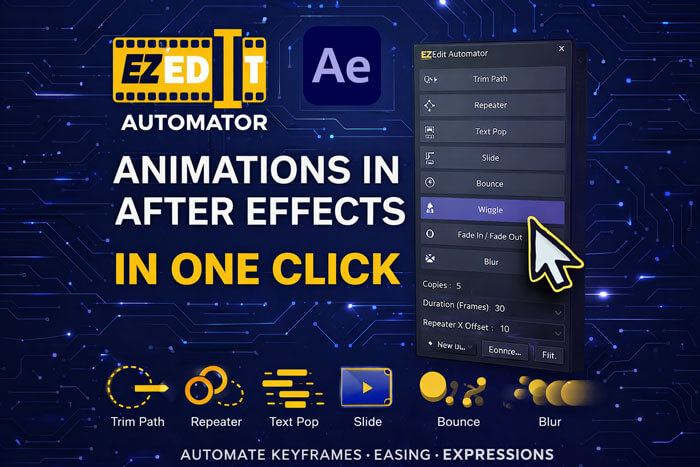
EZEdit Automator turns complex animation workflows into simple one-click tools.
Now you can generate professional animations instantly without writing expressions or manually creating keyframes.
Just select your layer → click a button → animation is ready.
🎬 Plugin Features
Auto Trim Path Animation
Instantly apply Trim Path animation to shape layers.
Perfect for:
• Logo reveals
• Line animations
• Motion graphics
Auto Repeater Animation
Create beautiful repeating animations with customizable settings.
Adjust:
-
Copies
-
Offset
-
Rotation
-
Animation timing
Perfect for circular and radial designs.
Text Pop Animation
Create stylish pop-in text animation with scale and opacity.
Perfect for:
• Titles
• YouTube captions
• Reels and Shorts
Slide Animation Generator
Animate elements from different directions instantly.
Choose from:
⬅ Slide from Left
➡ Slide from Right
⬆ Slide from Top
⬇ Slide from Bottom
Great for transitions and titles.
Bounce Animation
Apply bounce expressions automatically for natural motion.
No coding required.
Wiggle Animation
Add dynamic movement using one-click wiggle animation.
Perfect for floating objects and motion graphics.
Fade In / Fade Out
Create smooth opacity transitions instantly.
Blur Control
Turn blur effects ON or OFF with one click.
⚙ Smart Custom Controls
EZEdit Automator includes easy settings to customize animations.
Copies
Control number of repeated elements.
Duration (Frames)
Adjust animation timing easily.
Repeater X / Y Offset
Control spacing and positioning.
These controls make animation customization fast and simple.
⏱ Save Hours of Editing Time
Without Plugin
❌ Create keyframes manually
❌ Add expressions manually
❌ Adjust easing and timing
❌ Repeat for every layer
With EZEdit Automator
✔ One click animation
✔ Automatic expressions
✔ Ready-to-use presets
✔ Faster workflow
👨💻 Who Is This Plugin For?
EZEdit Automator is perfect for:
🎬 Motion Designers
📹 YouTube Video Editors
📱 Social Media Creators
💼 Freelancers
🎓 After Effects Beginners
If you create YouTube videos, reels, ads, or motion graphics, this plugin will significantly speed up your work.
💻 Compatibility
Works with:
• Adobe After Effects CC 2019 and newer
• Windows & Mac
• Lightweight and fast
No advanced knowledge required.
📦 What You Get
After purchasing EZEdit Automator you will receive:
✔ Plugin Script File
✔ Installation Guide
✔ User Documentation
✔ Lifetime Access
✔ Free Updates
⭐ Why Creators Love EZEdit Automator
✔ Saves hours of animation work
✔ Easy to use interface
✔ Perfect for beginners
✔ Speeds up professional workflow
✔ Lightweight and fast
💰 Pricing
EZEdit Automator
One-time purchase
✔ Full Plugin Access
✔ All Animation Tools
✔ Free Updates
✔ Installation Guide
🔥 Launch Price: Rs. 199


Reviews
There are no reviews yet.