Live Video Editing Classes Start

Live Video Editing Classes Start Apply Now
Limited Time Offer EZEDIT All Course - Yearly Membership Plan at Only 7999 Rs. | Offer End in
smart dark mode chrome extension

Enable dark mode on any website with eye care, brightness, contrast, and warmth control. Works everywhere instantly.

Make Every Website Easy on Your Eyes in Just One Click.

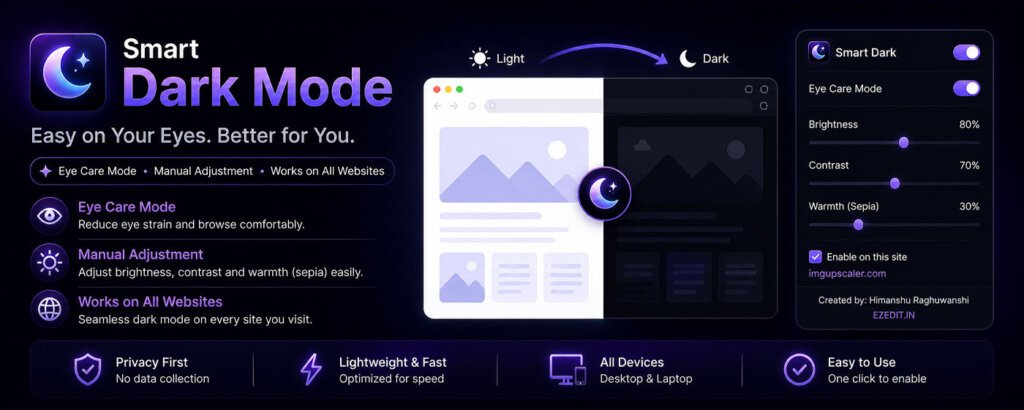
Smart Dark Mode lets you instantly enable dark mode on any website — reducing eye strain and improving your browsing comfort with powerful controls like Brightness, Contrast, and Warmth (Sepia).

No more harsh white screens. No more eye fatigue. No need for complicated settings or external tools.

Just click, customize, and browse comfortably.

✨ Key Features

🌙 Smart Dark Mode for All Websites

  • Instantly apply dark mode to any website
  • Works on almost all pages automatically
  • Clean and readable dark themes

👁️ Eye Care Mode

  • Reduces eye strain and fatigue
  • Lowers blue light exposure
  • Perfect for long browsing sessions

🎚️ Manual Adjustment Controls

  • Adjust Brightness for comfortable viewing
  • Control Contrast for better readability
  • Add Warmth (Sepia) for a softer experience

⚡ One-Click Activation

  • Simple and easy to use
  • Enable or disable instantly
  • No setup required

🌐 Works Everywhere

  • Compatible with most websites
  • Works on blogs, dashboards, social media, and more

🔒 Privacy First

  • No data collection
  • No tracking
  • Everything runs locally in your browser


🚀 Lightweight & Fast

  • Minimal performance impact
  • Smooth browsing experience
  • No lag or slowdown

🎯 Why Use Smart Dark Mode?

✔ Reduce eye strain
✔ Improve sleep by lowering blue light
✔ Customize your viewing experience
✔ Work comfortably for long hours
✔ Enjoy dark mode on every website


🛠️ How to Use

  1. Install the extension
  2. Click on the extension icon
  3. Enable Smart Dark Mode
  4. Adjust brightness, contrast, and warmth if needed
  5. Enjoy comfortable browsing

📦 Features Overview

  • Full website dark mode
  • Eye care mode
  • Brightness control
  • Contrast adjustment
  • Warmth (sepia) filter
  • One-click enable/disable
  • Works on all websites

Privacy Policy – Smart Dark Mode

Smart Dark Mode is designed with your privacy in mind. We are committed to ensuring that your data remains safe and secure.


📌 Information We Collect

We do not collect, store, or share any personal information.

  • No personal data is collected
  • No browsing history is tracked
  • No user activity is monitored
  • No data is sent to external servers

🖥️ How the Extension Works

Smart Dark Mode works entirely locally within your browser.

  • The extension applies dark mode styles to webpages
  • All adjustments (brightness, contrast, warmth) are processed on your device
  • No data leaves your system

⚙️ Permissions Usage

We request only minimal permissions required for functionality:

  • Active Tab → To apply dark mode to the current webpage
  • Scripting → To modify page styles for dark mode
  • Storage → To save user preferences (like brightness, contrast, and warmth settings)

These permissions are used strictly for the extension’s core functionality.


🔐 Data Security

Since no data is collected or transmitted, your information remains completely private and secure.


🚫 No Third-Party Services

  • No analytics tools are used
  • No third-party tracking
  • No external APIs or servers

👶 Children’s Privacy

Smart Dark Mode does not knowingly collect any information from children or any users.


🔄 Changes to This Policy

We may update this Privacy Policy if needed. Any changes will be reflected here.


📩 Contact

If you have any questions about this Privacy Policy, you can contact us at:
contact@ezedit.in


✅ Summary

  • ✔ No data collection
  • ✔ No tracking
  • ✔ Works locally
  • ✔ 100% privacy-focused
0
    0
    Your Cart
    Your cart is emptyReturn to Shop
    Scroll to Top