
EZ Motion Tracking – Smart Object Tracking & Video Stabilization
Track Any Object. Attach Motion. Stabilize Your Footage.
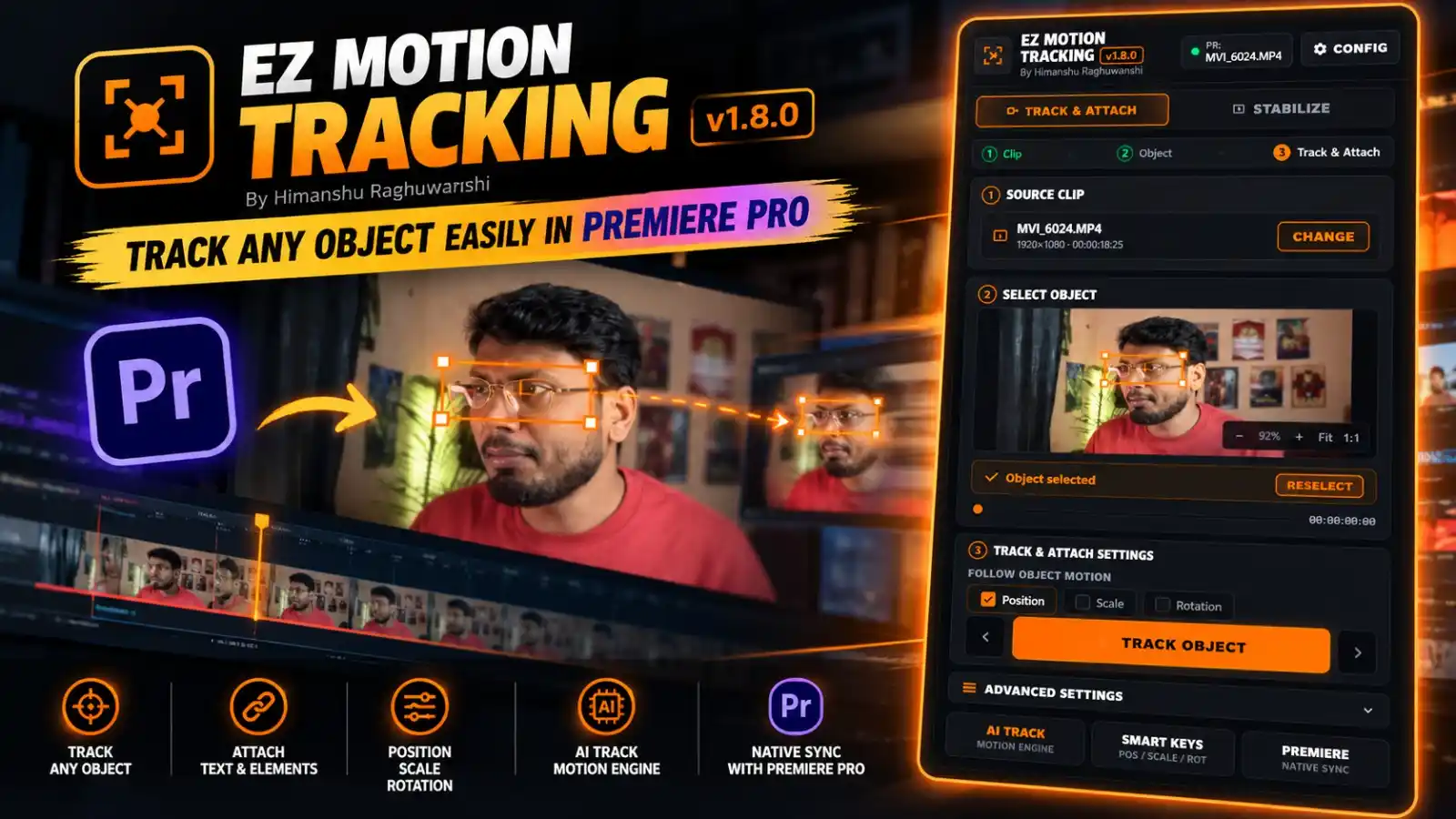
Take your video editing workflow to the next level with EZ Motion Tracking, a powerful tracking plugin designed for Adobe Premiere Pro. Track selected objects in your footage, follow their movement, and create more dynamic edits with an intuitive, step-by-step interface.
Whether you’re tracking a face, following a moving subject, attaching motion to an object, or stabilizing shaky footage, EZ Motion Tracking brings essential tracking tools together in one convenient panel.
With object selection controls, customizable tracking settings, and dedicated tracking and stabilization modes, you can work more efficiently without navigating complicated workflows.
🔥 Key Features
🎯 AI-Powered Object Tracking
Select an object in your video and use the tracking workflow to follow its movement across the footage.
🖱️ Simple Object Selection
Select the specific subject or area you want to track directly from the video preview. Reselect the object whenever you need to adjust your tracking target.
📍 Track & Attach
Follow the movement of your selected object to support motion-based editing and tracking workflows.
🎛️ Customizable Tracking Settings
Choose which motion properties to follow:
- Position – Track movement across the frame.
- Scale – Account for changes in the object’s size.
- Rotation – Follow rotational movement.
🎬 Dedicated Stabilization Mode
Access a separate Stabilize section for video stabilization workflows, making it easier to switch between tracking and stabilization tasks.
⚙️ Advanced Settings
Access additional controls to fine-tune your tracking workflow and adapt the process to your footage.
🔗 Premiere Pro Integration
Designed to work within the Premiere Pro editing environment, keeping your tracking workflow close to your timeline and source footage.
🧭 Step-by-Step Interface
Follow a clear three-stage workflow:
- Clip – Select your source video.
- Object – Select the subject or area to track.
- Track & Attach – Configure tracking settings and start tracking.
🎯 Perfect For
- Face & Subject Tracking
- Moving Object Tracking
- Motion-Based Video Editing
- Social Media Reels & YouTube Shorts
- Product Videos & Promotional Content
- Cinematic Video Projects
- Creative Motion Graphics Workflows
- Video Editors & Content Creators
🚀 Why Choose EZ Motion Tracking?
Tracking moving objects manually can be time-consuming. EZ Motion Tracking provides a dedicated interface for selecting a target, choosing tracking properties, and running the tracking workflow from one place.
Whether you’re working with moving subjects, changing object sizes, or rotating elements, the available controls help you configure the tracking process for your project.
📦 Product Details
- Product Name: EZ Motion Tracking
- Displayed Version: 1.8.0
- Developer: Himanshu Raghuwanshi
- Software: Adobe Premiere Pro
- Main Modes: Track & Attach and Stabilize
- Tracking Options: Position, Scale & Rotation
- Additional Controls: Object Selection, Advanced Settings & Configuration
- Workflow: Select Clip → Select Object → Track & Attach
⚡ Make Motion Tracking Easier
Bring more control and convenience to your editing process with EZ Motion Tracking for Premiere Pro. Select your subject, configure the tracking settings, and streamline your motion-tracking workflow from a dedicated panel.
Select. Track. Attach. Stabilize. Create More.



Reviews
There are no reviews yet.