
Key Features
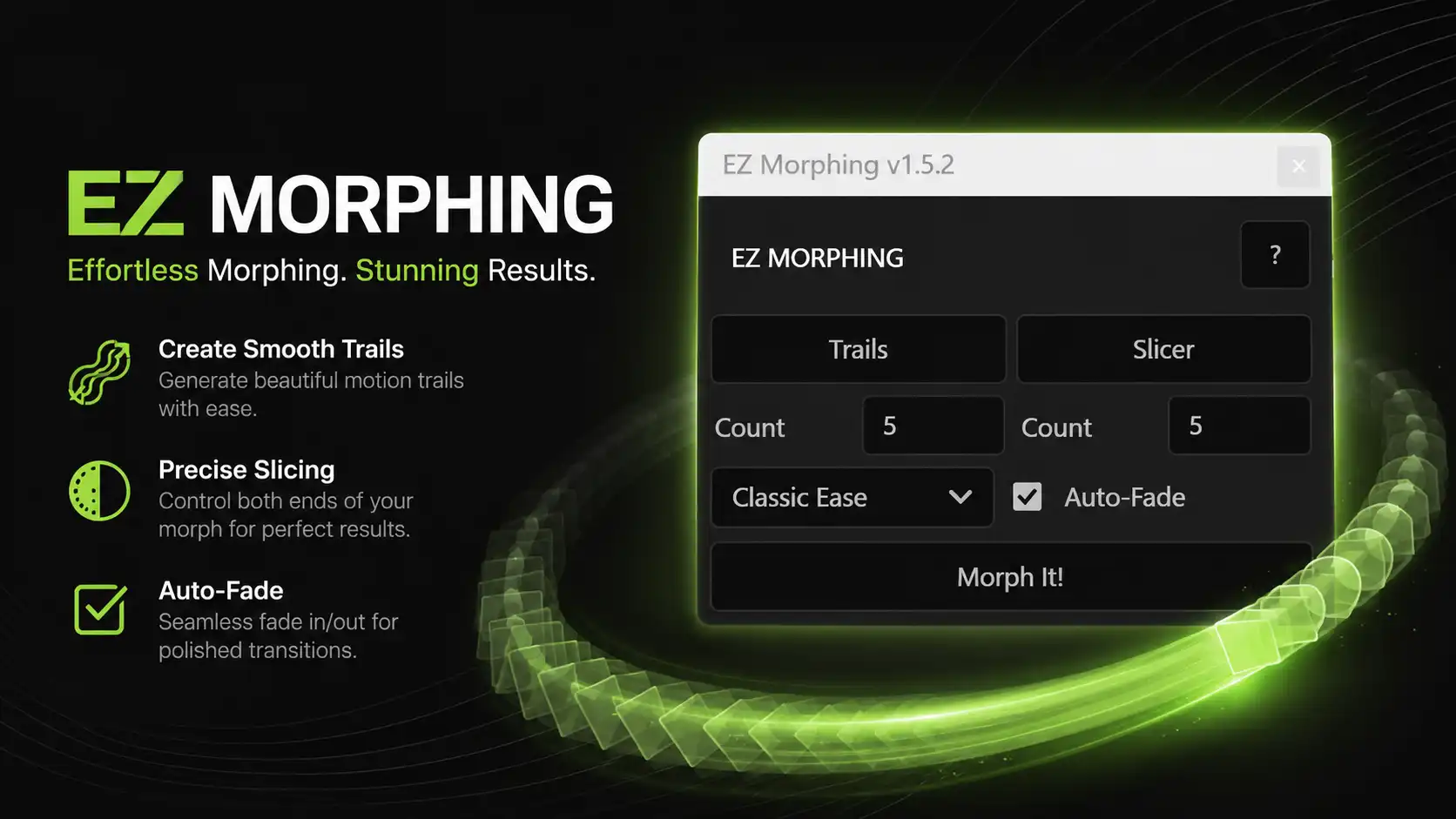
Smooth Morph Transitions
Create seamless transformations between objects, shapes, text, and graphics with advanced morphing technology.
Trail Morph Effect
Generate beautiful motion trails that add fluidity and dynamic movement to your animations.
Slicer Morph Effect
Create unique sliced transition effects for modern motion graphics, logo reveals, and creative animations.
Auto Fade Control
Automatically fade elements in and out during the morph process for cleaner and more professional results.
Customizable Count Settings
Adjust the number of morph slices or trails to achieve the exact look you want.
Professional Easing Presets
Choose from built-in easing options to create natural and visually pleasing motion.
One-Click Workflow
No complicated setup required. Simply select your layers, adjust settings, and click “Morph It!”
Why Choose EZ Morphing?
✅ Save Hours of Animation Work
✅ No Advanced After Effects Skills Required
✅ Create Professional Morph Effects Instantly
✅ Lightweight & Fast Performance
✅ Beginner-Friendly Interface
✅ Perfect for Social Media, Commercials & Motion Graphics
Perfect For
- Logo Morph Animations
- Text Transformations
- Shape Morphing
- Motion Graphics Projects
- YouTube Videos
- Corporate Presentations
- Product Promo Videos
- Explainer Videos
- UI & App Animations
- Social Media Content
- Reels & Shorts
How It Works
Step 1
Select the layers you want to morph.
Step 2
Choose between Trail Mode or Slicer Mode.
Step 3
Adjust count, easing, and fade settings.
Step 4
Click Morph It!
Step 5
Watch EZ Morphing generate a smooth transition automatically.
Compatibility
Software: Adobe After Effects
Supported Versions: After Effects CC 2020, CC 2021, CC 2022, CC 2023, CC 2024, and newer
Platform: Windows & macOS
Who Is This Plugin For?
EZ Morphing is built for:
- Motion Designers
- Video Editors
- Freelancers
- YouTubers
- Content Creators
- Agencies
- Filmmakers
- Animation Studios
- Social Media Managers
Whether you’re creating client projects or personal content, EZ Morphing helps you produce high-quality morph animations faster than ever.
Frequently Asked Questions
Does EZ Morphing work with text layers?
Yes, you can morph text, shapes, logos, icons, and many other layer types.
Do I need advanced After Effects knowledge?
No. EZ Morphing is designed for beginners and professionals alike.
Does it support the latest version of After Effects?
Yes, the plugin supports most recent versions of Adobe After Effects.
Is the plugin lightweight?
Absolutely. EZ Morphing is optimized for smooth performance and fast workflow.
Can I use it for commercial projects?
Yes. You can use EZ Morphing for both personal and commercial work.
Download EZ Morphing Today
Create smooth, eye-catching morph transitions in seconds and elevate your motion graphics workflow with EZ Morphing – the easiest way to generate professional morph animations inside Adobe After Effects.


Shivam Jain –
Amazing and affordable plugin thanks for making this plugin. Keep it up bro.