
EZYT Import v3.0 – Import Videos Directly into Premiere Pro
Download. Trim. Import. Edit Faster.
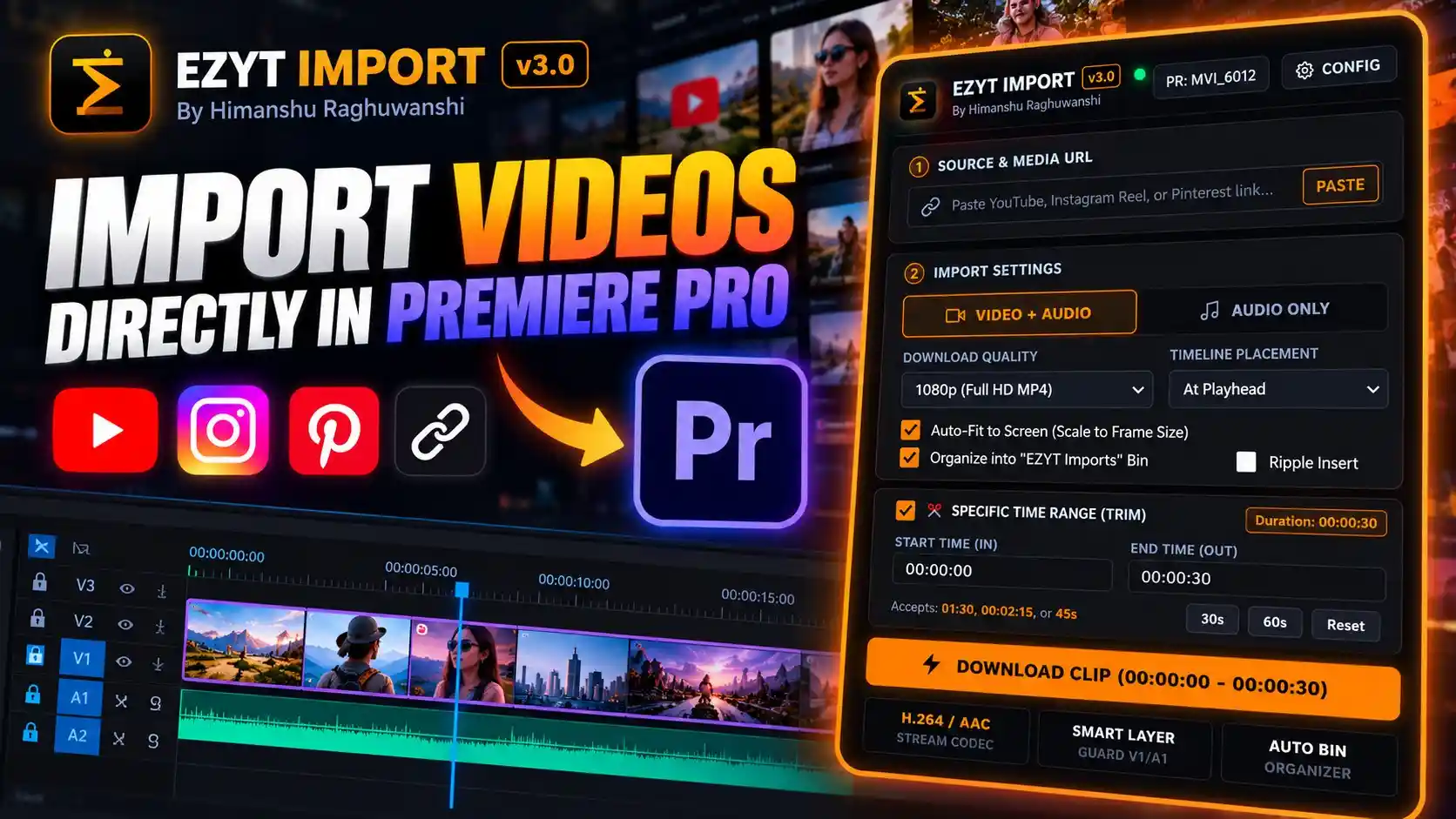
Simplify your video editing workflow with EZYT Import v3.0, a powerful media importing plugin designed to help video editors bring online video and audio content directly into Adobe Premiere Pro.
Stop switching between your browser, external download tools, file folders, and editing timeline. With EZYT Import, you can paste a supported media URL, choose your import settings, trim the exact section you need, and place your media directly into your Premiere Pro project.
Whether you’re editing YouTube videos, Instagram Reels, Pinterest content, tutorials, documentaries, or social media projects, EZYT Import helps streamline media preparation so you can spend more time creating.
🔥 Key Features
1. YouTube, Instagram & Pinterest Import
Paste a supported video URL from YouTube, Instagram Reels, or Pinterest to begin the media import workflow from one convenient interface.
2. Video + Audio or Audio Only
Choose the import mode that suits your project:
- Video + Audio: Import video content with its accompanying audio.
- Audio Only: Import audio for voiceovers, reference tracks, and other supported audio workflows.
3. Flexible Download Quality
Select your preferred available output quality, including the displayed 1080p Full HD MP4 option, depending on source availability and platform limitations.
4. Specific Time Range & Clip Trimming
Download only the section you need instead of importing an entire video.
- Set a custom start time and end time.
- Use quick 30-second and 60-second duration controls.
- Reset the time range when needed.
- View the selected clip duration before downloading.
This feature is especially useful when you need a short reference clip or a specific moment for your edit.
5. Direct Timeline Import
Choose where imported media should be placed in your Premiere Pro timeline, including the current playhead position.
Reduce unnecessary steps between downloading footage and getting started with your edit.
6. Auto-Fit to Screen
Enable Auto-Fit to Screen (Scale to Frame Size) to help fit imported video footage to your sequence’s frame dimensions.
This is particularly convenient when working with footage from different sources or preparing clips for social media formats.
7. Automatic Media Organization
Keep your projects organized with the option to place imported media into a dedicated “EZYT Imports” bin in Premiere Pro.
Spend less time searching through project panels and more time working on your timeline.
8. Ripple Insert Option
Use the optional Ripple Insert control to support your preferred timeline insertion workflow when adding imported clips.
9. H.264 / AAC Stream Codec
The interface identifies H.264 video and AAC audio stream codecs, providing a familiar media format for compatible editing workflows.
10. Smart Layer Guard
The interface highlights a Smart Layer Guard for V1/A1, designed around video and audio timeline track management.
11. Convenient Configuration Panel
Access the plugin’s configuration settings through the built-in Config interface.
🎬 Perfect For
- YouTube Video Editors
- Instagram Reels & YouTube Shorts Creators
- Pinterest Video Content Creators
- Documentary & Research-Based Editing
- Educational Videos & Tutorials
- Social Media Content Production
- Freelance Video Editors
- Creative Projects Using Authorized Reference Footage
⚡ Why Choose EZYT Import v3.0?
Traditional media importing often involves several separate steps: finding a video, downloading it, trimming it in another application, organizing the file, and importing it into Premiere Pro.
EZYT Import brings these tasks into a streamlined workflow.
Paste your source link, select your preferred settings, specify the clip range, and prepare your media for editing—all through a dedicated Premiere Pro interface.
Whether you need a complete video or just a short section, EZYT Import is designed to make media preparation more convenient.
📦 Product Details
- Product Name: EZYT Import v3.0
- Product Type: Media Import & Video Download Workflow Plugin
- Developer: Himanshu Raghuwanshi
- Supported Software: Adobe Premiere Pro
- Supported Sources Shown: YouTube, Instagram Reels & Pinterest
- Import Modes: Video + Audio and Audio Only
- Displayed Download Quality: 1080p Full HD MP4
- Clip Trimming: Custom Start & End Times
- Timeline Placement: At Playhead
- Media Organization: EZYT Imports Bin
- Additional Controls: Auto-Fit to Screen, Ripple Insert, Smart Layer Guard & Configuration
⚠️ Important Information
- Download availability, resolution, and supported links may vary by platform, source content, and plugin compatibility.
- Use the plugin only for content you own or are authorized to download. Respect copyright, privacy, and applicable platform terms.
- EZYT Import is an independent third-party product and is not affiliated with or endorsed by Adobe, YouTube, Instagram, or Pinterest.
- Confirm the supported Premiere Pro versions, operating systems, and installation requirements before purchasing.
🚀 Upgrade Your Premiere Pro Workflow
Stop wasting time moving between multiple applications just to prepare your footage. With EZYT Import v3.0, simplify importing, trim the clips you need, and keep your media organized inside Premiere Pro.
Import Smarter. Trim Faster. Edit Without Interruptions.


Reviews
There are no reviews yet.